01
The same work, saved again and again.
Exports, media, and decks pile up across Downloads and shared folders. Similar filenames cannot tell you which copies are truly identical.
Clean and organize files on your computer, then bring research, leads, automation, and everyday operations into one approved workspace—with Aura to coordinate the work and you in control of consequential actions.
Working product evaluation · 50-second demo · No signup
For the people who own the mess and the risk
Bulk file cleanup is easy to postpone. Every duplicate is a decision, every move can break someone’s workflow, and every new AI tool creates another data-boundary question.
Exports, media, and decks pile up across Downloads and shared folders. Similar filenames cannot tell you which copies are truly identical.
Without a file-by-file preview and an undo path, someone has to inspect every decision. The safest choice becomes doing nothing.
Before assistant commands touch a library, your team needs to know what leaves the machine, what runs automatically, and who approved it.
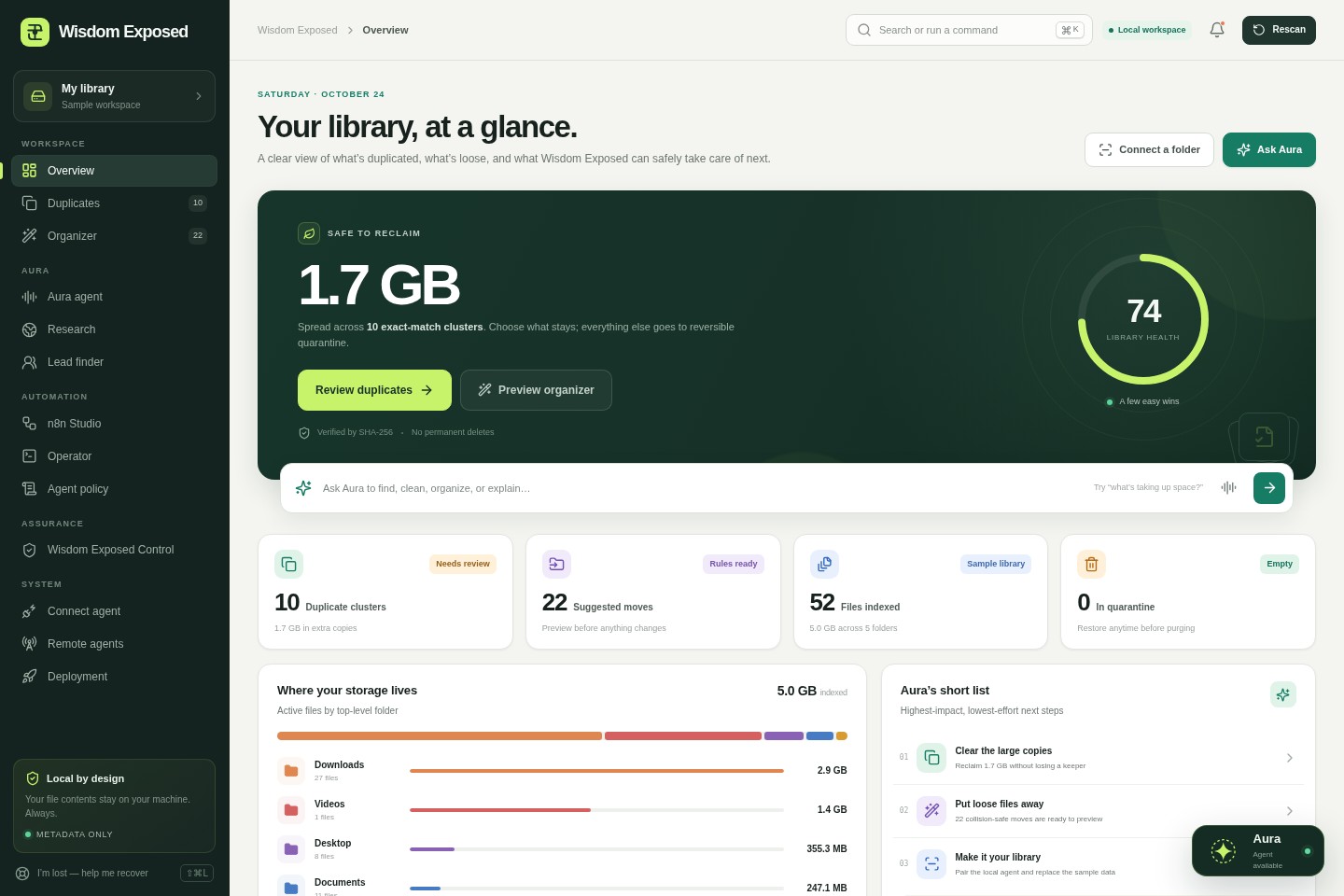
Every screen below is captured from the working Wisdom Exposed product. Open the sample workspace to inspect the complete flow yourself.
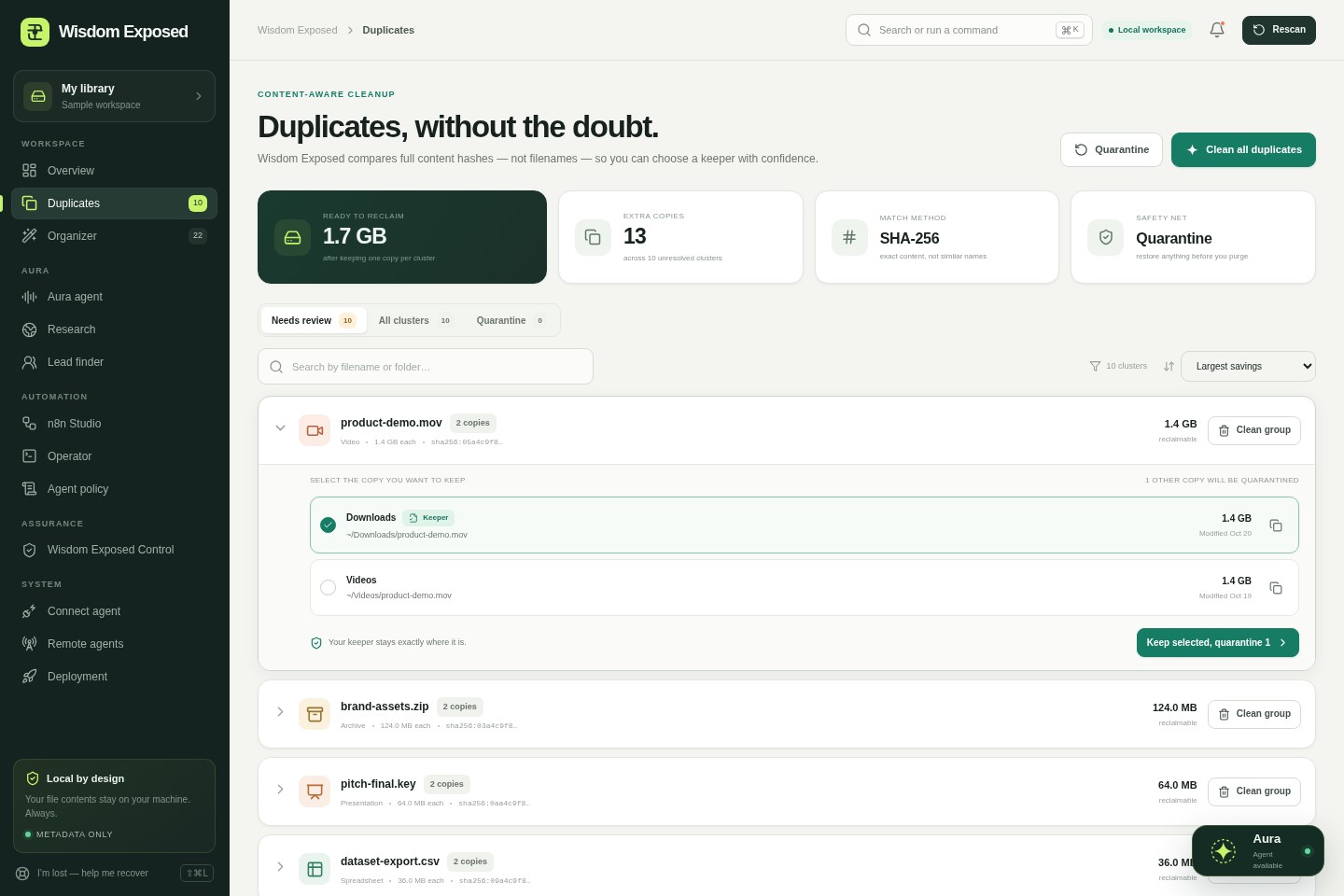
Wisdom Exposed compares full SHA-256 content hashes—not similar filenames—groups exact matches, and makes the keeper explicit.
Start with Local File Control, then add only the workflows you need. Here is the problem each feature solves, the value it provides, and where it fits in the plan.
See library health, exact-match clusters, suggested moves, storage distribution, and recent activity together.
Compare full SHA-256 content hashes across file types, choose keepers explicitly, and review potential savings.
Move extra copies to reversible quarantine and restore them before choosing a deliberate purge.
Preview priority-ordered rules, individual destinations, and filename collisions before applying a plan.
Hash and operate on chosen folders locally, begin with a dry run, and revoke each machine independently.
Review what was proposed, approved, queued, applied, cancelled, or restored.
Use guided tours, contextual explanations, and a recovery path instead of guessing what to do next.
Work across the product without giving an assistant unrestricted control. Application-wide assistance, explicit voice sessions, agent policy, and coordinated approval-gated plans.
Reduce investigation time while keeping receipts visible. Multi-source research with receipts, source cards, and exports.
Reduce manual research without presenting patterns as verified contact data. Company discovery, evidence-labelled contact patterns, pipeline notes, and CSV export.
Build inspectable automations with a visible draft before optional deployment. Prompt-assisted workflow drafts, visual inspection, templates, JSON export, and optional deployment.
Prepare useful actions while keeping execution explicitly approval-gated. Scoped local tasks and exact-command approval for controlled execution.
Extend approved workflows without opening customer self-service into admin deployment. Admin-controlled remote-machine setup, revocable agents, installer generation, and deployment tools.
Organize the work without claiming certification, managed compliance, or live connectors. Controls, evidence, risks, remediation, assets, and an audit room in one illustrative evaluation workspace.
For local file work, the agent reads only the roots you choose and computes content hashes on that machine. The workspace uses path, size, timestamp, and hash metadata for review—not the contents of those files.
File hashing and approved file operations run on your computer. File contents are not uploaded for cleanup. A locally configured server can keep metadata local too.
Do not enter sensitive, confidential, regulated, or personal information. Online research, lead discovery, third-party AI, and external automations send information only when you choose to use them.
Files stay on the device that owns them.
Read-only dry run is the starting point.
Preview destinations and approve actions.
Quarantine supports restore before purge.
Pair a machine, choose its roots, and inspect the index before enabling approved disk operations.
Duplicate cleanup moves files to a dedicated quarantine. Restore them before choosing a permanent purge.
Operator permission scopes start off. Exact task requests still require individual approval before execution.
Each local agent receives its own token. Revoke one machine without changing the others.
Core file workflows are deterministic. Local Ollama is optional; external research providers require separate configuration.
Inspect the readable agent and deployment assets. Test network boundaries, persistence, and access control against your requirements.
Evaluate the workflow locally, pair a scoped agent, or bring up the full Docker stack. You can inspect each layer before adding more folders, machines, or automation.
Install under the local user profile, launch on localhost, and evaluate Aura in an Edge app window.
Pair a Python agent with the folders you choose. Start with a dry run and enable apply mode only after review.
Run Wisdom Exposed with persistent Postgres metadata and n8n. Add Ollama through the optional AI profile.
The hosted preview persists workspace state in the browser. Before multi-user production use, configure and test persistent server storage and your organization’s authentication and access controls.
Build a plan around the work you actually need using standard 30-day prices. The plan builder is free to explore; checkout, trials, and paid activation are not connected.
Card required when checkout is connected. No charge without a plan selection after the trial.
Select the base, individual add-ons, or Full Access. This page does not collect payment or activate a plan.
Paid activation will use a secure account-specific download—not a public paid link. Cancellation will be included before billing opens.
Start with one bounded library and a question your team can answer. Use the builder to create a brief for an internal review—without submitting your information anywhere.
Pick a folder where duplicates or loose files are a known problem.
Inspect the index and proposed actions before enabling apply mode.
Include quarantine and restore verification in the evaluation.
Review what worked before expanding scope or automation.
Need the technical detail? The working product includes the agent, policy console, and deployment assets.
Inspect the full productNo. The local agent computes hashes and reads files on the machine that owns them. The workspace uses file metadata for indexing and review, not the contents of those files. A locally configured server can keep that metadata local; a hosted workspace receives only the metadata you choose to connect. Optional external services are separate choices.
Yes. Duplicate matching, organizer rules, command handling, and policy gates do not require an external AI provider. Ollama is an optional local integration. Grounded web research and lead discovery use external providers only when you configure and choose them.
Use sample data and test folders only. Do not enter sensitive, confidential, regulated, or personal information. The hosted app is a product evaluation, not a production data-processing service.
No. The plan builder displays approved standard prices and lets you copy a selection, but it collects no payment and activates no subscription or entitlement. Checkout, accounts, cancellation, and paid delivery remain separate backend work.
When card-secured checkout is connected, the full-feature trial lasts 14 days and requires a card. After the trial, select a plan to begin a paid 30-day period; if you do not select a plan, there is no charge. Paid delivery will use a secure account-specific entitlement, not a public paid download URL. Billing is not connected on this page today.
No. It is a working product evaluation with browser-persisted workspace state. Before multi-user production use, configure persistent server storage and review your organization’s authentication, authorization, backup, retention, and network requirements.
Choose one bounded test library with a known cleanup problem. Run a dry scan, review exact-content duplicate clusters, preview organizer moves, and test a restore from quarantine. Expand only after the team is satisfied with the decisions and controls.
Explore the working sample with test data, choose a plan, then create a pilot brief your team can review.